Integrating Catchy Bellonia: A Practical Guide for Modern Creators
In the world of digital design and content creation, typography is not merely an aesthetic choice; it is a functional tool that dictates readability, brand tone, and user experience. Selecting the right typeface is a critical decision in the planning phase of any project, whether you are designing a wedding invitation, building a landing page, or creating social media assets. Among the myriad of options available to designers and creators, Catchy Bellonia stands out as a versatile, relaxed cursive script font that balances elegance with legibility. Understanding how to integrate this specific font into your workflow can streamline your design process and elevate the quality of your final output.
Understanding the Technical Anatomy of Catchy Bellonia
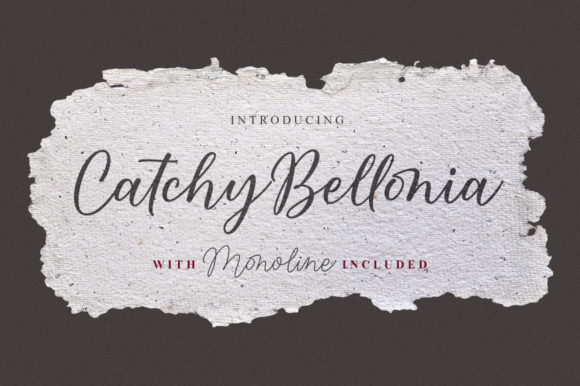
Before integrating any asset into a professional workflow, it is essential to understand its technical specifications and design philosophy. Catchy Bellonia is characterized by its relaxed, cursive style. Unlike some script fonts that suffer from extreme thinness or excessive boldness, this font strikes a deliberate balance. It is designed to be legible while maintaining the fluid, organic feel of handwriting.
One of the most significant technical advantages of this font is its weight distribution. Because it is neither too thin nor too thick, it renders well across various media, from high-resolution print to lower-resolution digital screens. For professionals managing diverse outputs, this consistency reduces the need for constant font swapping between platforms.
- Style: Relaxed, cursive script.
- Variation: Includes a Mono-line version for cleaner applications.
- Encoding: PUA (Private Use Areas) encoded.
The inclusion of a mono-line version is a practical feature that expands the font's utility. While the standard version offers a more traditional script look, the mono-line variant is ideal for laser cutting, engraving, or modern digital interfaces where consistent stroke width is required for visual clarity.
The Critical Role of PUA Encoding in Your Workflow
For designers, marketers, and entrepreneurs, time is a finite resource. One of the most common bottlenecks in the design process is the inability to access specific glyphs or alternate characters within a font file. This is where the PUA encoding of Catchy Bellonia becomes a significant workflow enhancer.
PUA, or Private Use Areas encoding, means that all glyphs—including special characters, swashes, and ligatures—are mapped to specific codes that are accessible regardless of the operating system or software limitations. In practical terms, this means you do not need to be an expert in advanced OpenType features to use the font's full potential.
Implementation Without Barriers
In a typical workflow, a creator might use a tool like Adobe Illustrator or Photoshop. However, many entrepreneurs and small business owners rely on more accessible platforms like Canva or standard text editors. Without PUA encoding, accessing the "fancy" swashes of a script font often requires specialized software or a "Glyphs" panel.
Because Catchy Bellonia is PUA encoded, you can access every character using the standard "Character Map" on Windows or "Font Book" on Mac. You can simply copy the desired glyph and paste it directly into your design software. This democratization of design assets allows for rapid execution, particularly when working within web-based design tools that have limited font feature support.
Strategic Application: Where Does Catchy Bellonia Fit?
Effective design requires matching the tool to the task. A script font like Catchy Bellonia is not suitable for body text or dense paragraphs; its strength lies in display typography. Understanding where to deploy this font is key to maintaining quality control and readability in your projects.
Pre-Project Planning and Branding
Before starting a project, review your brand guidelines. If your brand voice is approachable, romantic, creative, or artisanal, Catchy Bellonia fits naturally into your visual identity. It is particularly effective for:
- Logo Design: The balanced weight ensures the logo remains legible when scaled down for business cards or profile pictures.
- Stationery: Ideal for wedding invitations, thank you cards, and personalized stationery where a human touch is desired.
- Headline Typography: In editorial design (blogs, magazines), use it for pull quotes or sub-headlines to break the monotony of sans-serif body text.
Integration with Marketing Assets
For marketers and content creators, visual hierarchy is crucial. When designing a Facebook ad or an Instagram story, the headline needs to grab attention immediately. The cursive, varied nature of Catchy Bellonia draws the eye without being aggressive.
When integrating this font into marketing workflows, consider the "Rule of Three" for typography: a display font (Catchy Bellonia), a body font (a clean sans-serif like Montserrat or Roboto), and an accent font (perhaps a monospace or slab serif). By pairing Catchy Bellonia with a geometric sans-serif, you create a high-contrast visual dynamic that guides the viewer's eye from the headline to the call-to-action.
Workflow Optimization: Managing Font Variations
A common oversight in the creative process is failing to utilize the full range of a font's offerings. Catchy Bellonia includes a mono-line version, which serves a distinct purpose in the execution phase of a project.
Digital vs. Print Execution
When moving from a digital concept to a physical product, ink bleed and resolution changes become factors. The standard version of Catchy Bellonia is excellent for high-quality digital displays or large-scale prints where detail is preserved. However, if you are producing small text on textured paper or engraving on wood, the mono-line version offers the necessary clarity.
A practical workflow tip is to design with the standard version for client approvals (as it looks more "finished") and switch to the mono-line version for the final production file if the medium requires it. This ensures the client sees the aesthetic vision while the final product maintains technical quality.
Organization and File Management
For freelancers and agencies handling multiple projects, font management is a silent productivity killer. To integrate Catchy Bellonia efficiently:
- Categorization: Tag the font in your management software (like Suitcase Fusion or FontBase) under "Script," "Relaxed," and "Wedding/Event."
- Project Association: If you use the font for a specific client brand, ensure the font file is stored in that client's asset folder to prevent "missing font" errors when reopening files months later.
- Compatibility Check: Before committing to the font for a large project, test the PUA glyphs in your specific software environment (e.g., Cricut Design Space, Procreate, or Webflow) to ensure the copy-paste method works seamlessly.
Practical Tips for Quality Control
Even with a balanced font like Catchy Bellonia, quality control is necessary to ensure the typography enhances rather than hinders the message.
Spacing and Kerning
Cursive scripts often require manual kerning adjustments, particularly between certain letter pairs (like 'b' and 'e', or 'o' and 'n'). Because Catchy Bellonia is designed to be varied and natural, the default spacing is generally good, but always inspect your headlines at 100% zoom. If letters collide in a way that obscures legibility, adjust the tracking or kerning manually.
Color and Contrast
Script fonts generally have a lower density of ink coverage compared to bold sans-serifs. When using Catchy Bellonia, ensure there is sufficient contrast against the background. Avoid placing this font over busy photography without a background overlay or shadow, as the thin-to-medium strokes can get lost in complex textures.
Conclusion: Enhancing the Creative Output
Integrating a font like Catchy Bellonia into your workflow is about more than just aesthetics; it is about efficiency and versatility. By leveraging its PUA encoding, you bypass technical barriers, allowing for faster execution in web-based and desktop tools alike. By understanding the distinction between its standard and mono-line versions, you can confidently apply it to both digital and physical mediums.
For the modern creator—whether you are a small business owner designing your own menus or a freelancer building a brand identity—having a reliable, balanced script font in your toolkit is indispensable. Catchy Bellonia provides the relaxed, cursive elegance required for high-end design, combined with the technical robustness needed for a smooth, professional workflow.