Integrating Ambitious Font into Your Professional Workflow
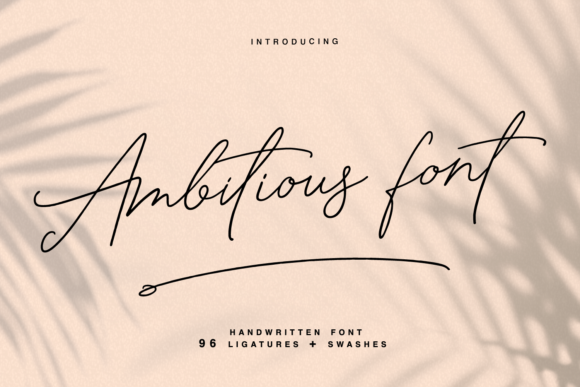
In the realm of digital design and branding, typography is often the silent workhorse that defines a project's success. While content drives the message, the typeface determines the tone. Among the myriad of options available to designers and entrepreneurs, Ambitious stands out as a specialized tool. It is a thin, cursive script font characterized by its elegant flow and unique letterforms. However, understanding what a font is and knowing how to execute a design project with it are two different things. For professionals ranging from marketers to small business owners, the challenge lies in integrating a typeface like Ambitious into a broader creative process without sacrificing legibility or professionalism.
Understanding the Characteristics of Ambitious
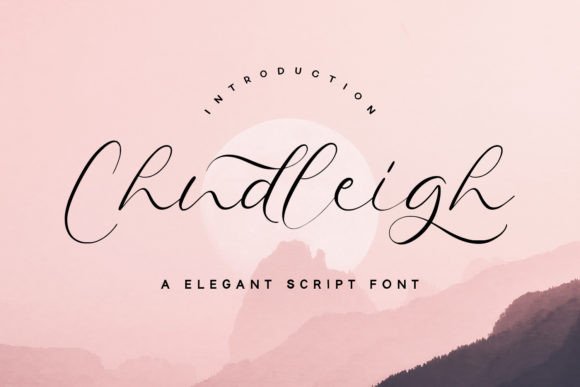
Before diving into execution, it is necessary to evaluate the asset. Ambitious is not a heavy, blocky font intended for dense body text. Its defining feature is its thin, cursive nature. Every letter in the set possesses a unique, hand-crafted touch, which allows designs to "come alive" with a sense of personality. This makes it an ideal choice for specific outputs where visual impact outweighs the need for quick-scanning information density.
In a practical workflow, categorizing your assets is the first step. You should classify Ambitious as a display font. This means its primary role is to draw the eye. It is the font you use for the headline, the logo, or the call to action, not the font you use for the terms and conditions or the blog post body. Recognizing this distinction early in the planning phase prevents the common error of using script fonts for long-form reading, which often leads to user fatigue.
Strategic Application: Where Ambitious Fits in Your Process
Integrating a new typeface requires a strategy. You cannot simply swap fonts mid-project and expect cohesive results. Ambitious is best introduced during the ideation and concept phase of a branding project. Because the font carries a specific aesthetic—romantic, elegant, and airy—it sets a strict direction for the rest of the visual identity.
Logo Design and Branding
For entrepreneurs and freelancers creating a brand identity, the logo is the cornerstone. Ambitious excels here because of its eye-catching cursive style. When used for a logo, the font does the heavy lifting of establishing the brand's voice. If you are designing for a boutique, a wedding planner, or a high-end lifestyle brand, Ambitious provides that immediate association with elegance.
However, the implementation requires care. Because the font is thin, it can disappear if placed against a high-contrast background or scaled too small. During the design phase, you must test the logo at various sizes. A practical tip is to ensure that the "x-height" and stroke width of Ambitious are visible on mobile screens before finalizing the vector file.
Marketing and Social Media Content
For marketers and social media managers, the workflow is often fast-paced. Ambitious serves as a tool to break the visual monotony of standard sans-serif posts. It is particularly effective for quote graphics and inspirational sayings. The unique touch of the letters adds emotional weight to the words, making the content more shareable.
In a content calendar workflow, you might pair Ambitious with a clean, geometric sans-serif font. For example, use Ambitious for the emotional hook (the quote), and a font like Montserrat or Lato for the attribution or the call to action. This pairing ensures that the design remains grounded and legible while still utilizing the aesthetic benefits of the script font.
Technical Integration and Workflow Efficiency
Adopting a new font affects your file management and technical setup. To use Ambitious efficiently, you must ensure it is installed across all devices used by your team. For agencies and collaborative teams, this means uploading the font files to your shared design library or cloud storage (like Adobe Creative Cloud Libraries or Figma shared styles).
Compatibility with Tools
Ambitious functions like any standard typeface, meaning it is compatible with major design software including Adobe Illustrator, Photoshop, InDesign, and Canva. However, because it is a cursive script, you may need to adjust kerning (the space between letters) manually. Script fonts often have connecting tails; if the spacing is too wide, the letters will appear disconnected, breaking the flow of the cursive style.
When implementing Ambitious in a vector environment, look for alternate characters or ligatures included within the font file. High-quality script fonts often come with variations of specific letters (like 'b', 'o', or 'r') to prevent repetition. Accessing these alternates via the Glyphs panel in Illustrator can elevate the design from "computer-generated" to "custom-made."
Practical Use Cases and Execution
To fully understand the utility of Ambitious, it helps to look at specific scenarios where the font solves a design problem or enhances a product.
- Wedding Invitations and Stationery: For designers in the event industry, Ambitious is a natural fit. It mimics the look of calligraphy without the high cost of a hand-letterer. The workflow involves typesetting the names of the couple in Ambitious, while using a serif font for the venue details and times.
- Product Packaging: Small business owners selling candles, soaps, or artisanal goods can use Ambitious to convey a "handmade" quality. The thin strokes suggest delicacy, which aligns with products that are often perceived as gentle or luxurious.
- Course Materials and E-books: Educators and bloggers creating digital products can use Ambitious for chapter titles. It adds a personal touch to educational content, making the material feel less academic and more approachable.
Quality Control and Consistency
One of the most critical stages in any design process is quality control (QC). When using a thin, cursive font like Ambitious, legibility is the primary metric for success. During the QC phase, you must view the design at the intended output size.
If you are designing a billboard, the thin strokes might get lost in the distance. If you are designing a business card, the text must be large enough that the ink doesn't bleed together during printing. A common workflow error is designing on a large, high-resolution monitor where the font looks crisp, only to have it become illegible on a small mobile screen. Always preview your work on the device your audience will use.
Color and Contrast
Ambitious requires high contrast to be effective. Because the strokes are thin, placing the font in a light grey color on a white background will result in invisibility. The implementation tip here is to use bold, solid colors for the text or a dark background with light text. This ensures that the "unique and beautiful touch" of the letterforms is actually visible to the end-user.
Long-Term Use and Brand Consistency
For freelancers and agencies, building a library of reliable fonts is an investment. Once you have integrated Ambitious into a client's branding or your own personal projects, you must document its usage. Create a style guide that specifies exactly how Ambitious should be used.
For example, your guide might state: "Ambitious is to be used only for H1 headers and Logo marks. It is never to be used for body copy or UI navigation elements." This documentation prevents scope creep and ensures that as you hand off projects to other team members or clients, the integrity of the design remains intact.
By treating Ambitious not just as a file to be downloaded, but as a strategic component of your visual communication, you move beyond simple decoration. You begin to use typography to influence how your audience feels about your brand, ensuring that your designs are not just seen, but remembered.